M
mail
Search mail
YO
Compose
Inbox3
Starred
Sent
Drafts2
Trash
Primary
SJ
Sarah JohnsonWed, Nov
Welcome to our platform! 🎉
Hi there,
MW
Marcus Webb9:15
Re: Design System Update
Looks great! I've left a few comments in Figma...
PN
Priya NairYesterday
Invoice #2841 — October
Please find attached the invoice for October...
DT
Dev TeamMon
Deployment successful ✓
Your latest deployment to production has completed...
SC
Sophie CraneSun
Coffee next week?
Would love to catch up! Are you free Tuesday...?
Welcome to our platform! 🎉
SJ
Sarah Johnson<sarah@company.com>
Wed, Nov 13, 2024 at 10:42 AM
Hi there, Thank you for signing up! We're really excited to have you on board. Your account is now active and you can start exploring everything we have to offer. Looking forward to seeing what you build! Best, Sarah
Reply
Forward

An inbox your visitors
already know how to read

MailView puts a pixel perfect email client on your page. Sidebar, inbox list and an open email, all filled in from the property panel. No screenshots, no Figma, no plugins.

One file
MailView.tsx, paste and go
No dependencies
Nothing to install or license
Fully editable
Every line from the panel
Responsive
Desktop, tablet and phone
01Property panel

Everything you see is a field, not a screenshot

Drop MailView on the canvas and fill it in like any other Framer layer. Nothing is baked into an image, so the copy stays editable, searchable and easy to change the day before launch.

The open email
Sender name, address, initials, avatar colour, subject, date and the full body text.
All five inbox rows
Every row in the list is yours: name, subject line, preview text, time and avatar.
Your own branding
Swap the mail logo for your own, and set the initials and colour of the account avatar.
An image instead of text
Turn on Show image and upload a newsletter export. Add a portrait crop for phones.
MailViewProperties
Open email
SenderSarah Johnson
Addresssarah@company.com
SubjectWelcome to our platform
DateWed, Nov 13 at 10:42
Body textHi there, thank you for...
Show imageoff
Body imageUpload
Mobile imageUpload
Inbox rows
SenderMarcus Webb
SubjectRe: Design System
PreviewLooks great, I left a few...
Time9:15
InitialsMW
Avatar#34A853
Topbar
LogoUpload
InitialsYO
Avatar#4285F4
Five inbox rows in total, each with its own sender, subject, preview, time and avatar.
02Example one

A plain text email, straight from the panel

Welcome mails, onboarding sequences, receipts, password resets. Type the copy in the body field and MailView takes care of the spacing, the avatar, the signature block and the reply buttons.

M
mail
Search mail
SM
Compose
Inbox3
Starred
Sent
Drafts2
Trash
Primary
NE
Nora EllisTue, Mar
Your workspace is ready
Hi Sam,
BL
Billing8:04
Invoice #2841 is paid
Thanks, your payment came through this morning.
PR
ProductYesterday
What shipped in March
Faster search, a new inbox filter and 14 small fixes.
YK
Yusuf KarimMon
Quick question about seats
We are adding two designers next week, can we...
SU
SupportSun
We answered your ticket
The export now includes the archived projects.
Your workspace is ready
NE
Nora Ellis<nora@brightloop.co>
Tue, Mar 4 at 09:12 AM
Hi Sam, Your workspace is live and your team can join with the link below. Everything you set up during the trial has been carried over, so you can pick up exactly where you left off. If you want a hand importing your old data, just reply to this email and we will do it for you. Have a good one, Nora
Reply
Forward
03Example two

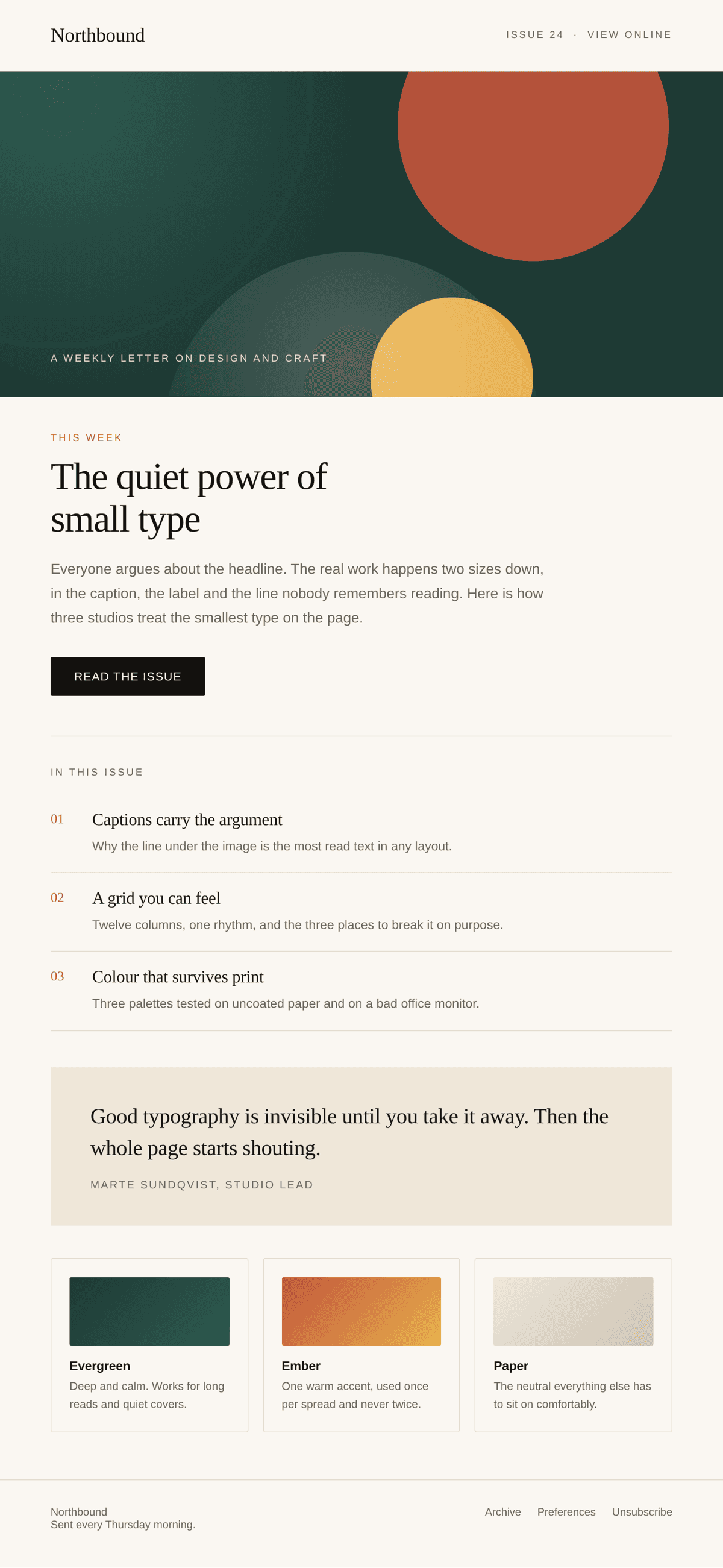
Or drop your newsletter in as an image

Export your campaign from Mailchimp, Beehiiv, Klaviyo or Figma, switch Show image on and upload it. The mockup scrolls the design inside the reading pane, exactly like a real client does. Add a portrait crop and phones get their own version.
M
mail
Search mail
MH
Compose
Inbox3
Starred
Sent
Drafts2
Trash
Primary
NB
NorthboundThu, Sep
Issue 24: the quiet power of small type
Hi there,
TF
Type Foundry9:15
Your licence is active
Both weights are ready to download.
NB
NorthboundYesterday
Issue 23: grids that breathe
Last weeks letter, in case you missed it.
RE
ReadersMon
Reply of the week
I printed the caption piece and pinned it up.
MS
Marte SundqvistSun
Loved this issue
That last spread is my favourite so far.
Issue 24: the quiet power of small type
NB
Northbound<hello@northbound.studio>
Thu, Sep 26 at 07:30 AM
Email content
Reply
Forward
04Responsive

It reshapes itself, you do not have to

One instance covers every breakpoint. MailView watches the width of the browser and drops panels as the screen gets smaller, so you never build a second version for phones.

Desktop720px and up
Sidebar, inbox list and the open email side by side.
Tablet500 to 720px
The sidebar folds away, list and email stay together.
Phoneunder 500px
One column with the open email, sized for a thumb.
05Where it fits

Made for pages that have to sell an email

SaaS landing pages
Show the onboarding mail, the alert or the weekly digest your product sends.
Newsletter sites
Give readers a look at an issue before they hand over their address.
Email designers
Present client work in a real client frame instead of a flat export.
Agency portfolios
Drop a campaign into a case study without rebuilding the interface.
06Setup

Three steps and it is on your page

01
Paste the link
Paste the MailView component link onto your Framer canvas. Nothing to download or unzip.
02
Place it on the page
Size it like any other layer: full width in a section, or fixed inside a device frame.
03
Fill in the panel
Type your own sender, subject and body, or upload an image. That is the whole setup.
Get it

Put it in your own inbox

A full email client mockup you fill with your own threads, labels and attachments. Buy it once and use it in every project you build.

Get MailView for $9
The Creator

Made by Michelle

I am Michelle. Under the name Zo-e I do branding, websites and marketing for companies that want to stand out, plus a growing set of Framer templates and components. I like taking a look inside a client's head and then making something better than they had in mind. This component started the same way.

Michelle de Haas, the designer behind Zo-e
MailView byWorks on every Framer plan. No plugins, no API, no backend.

Create a free website with Framer, the website builder loved by startups, designers and agencies.